Quoting software for small businesses: what to look for
A small company should choose quoting software by whether it works out net, VAT and gross in Hungarian, whether the customer can accept on a link, and whether the quote becomes an invoice reported to NAV in one step. This guide goes through the criteria, then compares five programs from the vendors' own pages.
Published: · By the HelloCRM team
The core CRM is free forever. Pre-register and be among the first in.
What should you look for in quoting software?
A quote is read by three people: whoever writes it, whoever accepts it, and the accountant who sees the invoice it becomes. Good software shortens all three jobs. Before you try any of them, write down how many quotes you send a month, who writes them and what happens after acceptance. On that basis two or three of the criteria below decide, and the rest are convenience.
- A Hungarian interface and a Hungarian document: net, VAT and gross per line and in total, in forints and in other currencies.
- Lines from a price list: your products and services are entered once, not typed again on every quote.
- Online acceptance: the customer accepts on a link, and it shows when and who accepted.
- Revisions: when you change a quote, the earlier one stays and you can see what changed.
- Quote to invoice: the accepted quote's lines go onto an invoice in one step, and the two totals agree.
- NAV: the invoice should be issued by software that reports it to NAV's Online Számla system.
- Follow-up: a reminder when the customer has not answered for days.
- Customer records: the quote belongs to the customer and the deal you already talked about.
Hungarian arithmetic is not a detail. If one program works VAT out on the total and another rounds per line, the same quote can show a couple of forints different from the invoice made from it, and somebody has to explain the gap. Ask the program to total three lines of 0.05 forints at 27 percent, and see whether the quote and the invoice agree.
Online acceptance matters because an emailed "fine, go ahead" is hard to find later and does not say which version was accepted. If the program records the time of acceptance and the version, a dispute does not mean digging through a mailbox.
How do the programs compare on the main criteria?
| Criterion | HelloCRMus | MiniCRM | Billingo | Számlázz.hu (Innonest) | Zoho Invoice |
|---|---|---|---|---|---|
| Hungarian interface | YesHungarian and English | Yessource | Yessource | Yessource | Nosourcethe language help lists English |
| The customer accepts online, on a link | Yeson a link, with an acceptance record | Partlysourcean email link with the Advanced Forms add-on; e-signing | Not statedsourceit can be sent by email | Not statedsourcethe issuer signs it and sends it by email | Yessourceon a customer portal |
| Quote to invoice in the same tool | Yesa draft invoice in one press | Not statedsource | Yessource | Yessourcethrough the Számlázz.hu integration | Yessource |
| Invoices reported to NAV | Yesthrough your own Számlázz.hu or Billingo account | Yessource | Yessource | Yessource | Not statedsource |
| A free plan with no time limit that includes quotes | Nothe core CRM is free, Quotes is a paid module | Nosourcea trial for a set period | Nosourcethere is a Free plan, but quotes are not in it | Not statedsourceSzámlázz.hu has a free plan; not said of Innonest | Yessourcewith usage limits |
| Customer records in the same tool | Yesit is the CRM itself | Yessource | Yessourcepartner and buyer records | Yessourcecustomer, product and service records | Not statedsourceZoho CRM is a separate product |
From the vendors' own pages, read 2026-10-17. "Not stated" means we did not find it on the pages we read; the product may still do it. Prices and ratings were not compared. Check the vendor's site before deciding, because plans change.
Which quoting programs can a small company choose from?
Details
The five programs below were described from the vendors' own pages on 17 October 2026, only with what we read there. It is not a ranking: the order follows how close each is to the Hungarian market, and HelloCRM comes last because it is our product.
MiniCRM. A Hungarian CRM with an invoicing module built in and a separate Quote product that builds quotes from templates. Its help says a link sent by email changes the quote's status from the customer's answer (this needs the Advanced Forms add-on), and there is digital document signing too. Issued invoices are passed on to NAV automatically. The pricing page mentions no free plan without a time limit, only a trial for a set period.
The vendor's own pages: MiniCRM: számlázás (read ); MiniCRM súgó: ajánlatok létrehozása (read ); MiniCRM súgó: digitális aláírás (read ); MiniCRM súgó: NAV-továbbítás (read ); MiniCRM: árak (read )
Billingo. A Hungarian online invoicing service in which quotes are a feature of their own: a quote can be sent by email, and an accepted quote becomes an order or an invoice. It automates NAV reporting, and partner and buyer records sit on one screen. It has a Free plan, but according to its plan comparison quotes are not part of it.
The vendor's own pages: Billingo: funkciók (read ); Billingo: árajánlat (read ); Billingo: csomagok (read )
Számlázz.hu, with Innonest. Számlázz.hu is an online invoicing and receipt service with automatic NAV reporting. Quotes are not made by the invoicing service itself but by Innonest, a business tool offered on its site, in which you send quotes, manage stock and projects, keep customer, product and service data in one place, and invoice directly through the Számlázz.hu integration. The issuer can sign the quote digitally and send it by email; the page says nothing about the customer accepting online.
The vendor's own pages: Számlázz.hu: Innonest (read ); Számlázz.hu: ingyenes online számlázó (read )
Zoho Invoice. An international invoicing and quoting service with a free plan that has no time limit, with usage limits. The customer can accept, decline or negotiate a quote on a customer portal, sign it with Zoho Sign, and an accepted quote becomes an invoice in one click. Its language help lists English, the pages we read say nothing about NAV or Hungary, and for customer management it offers the separate Zoho CRM.
The vendor's own pages: Zoho Invoice (read ); Zoho Invoice: estimates (read ); Zoho Invoice: pricing (read ); Zoho Invoice: change language (read )
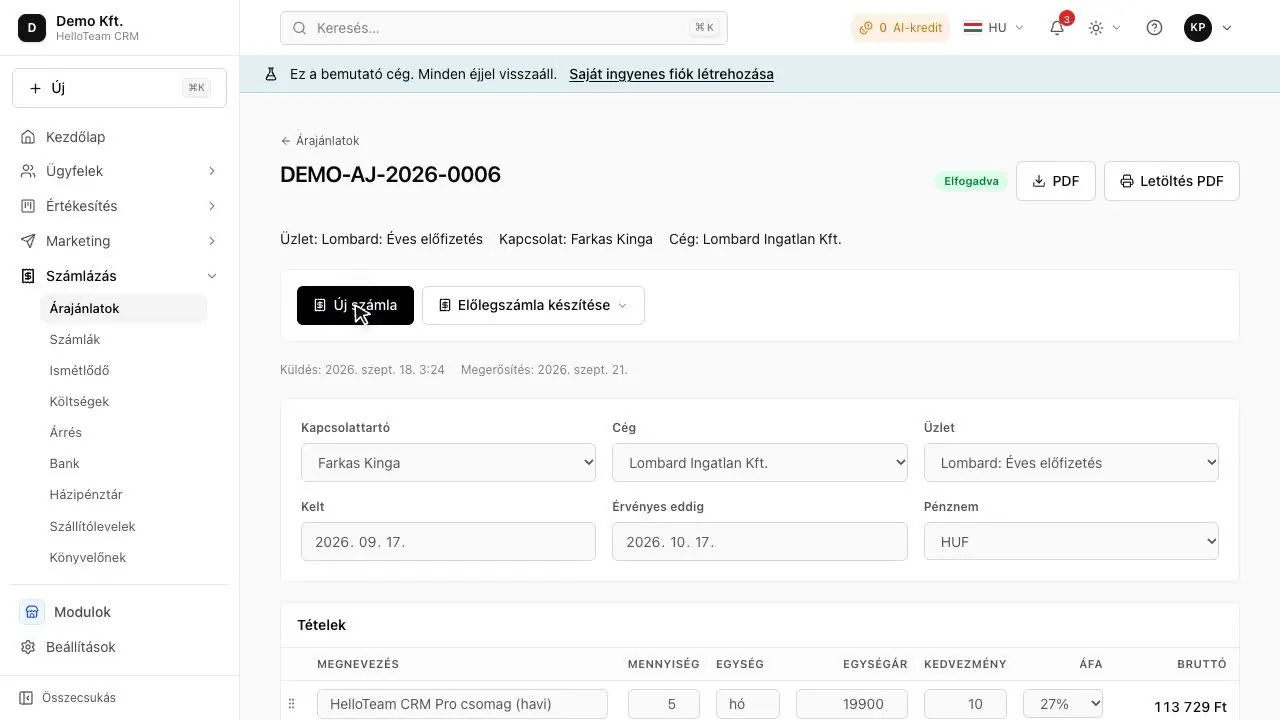
HelloCRM. A web CRM in Hungarian and English whose Quotes module totals the lines into net, VAT and gross, lets the customer accept on a link, and turns an accepted quote into a draft invoice in one press. The details are below.
What does HelloCRM's Quotes module do?
Details
- Lines come from a price list, net, VAT and gross rounded per line with the same arithmetic as the invoice, so the two totals agree.
- The customer opens it and accepts on a link; the acceptance is recorded, and the downloadable PDF is the last version sent.
- A change is a new revision: the earlier one is not overwritten.
- An accepted quote becomes a draft invoice in one press, with its lines and customer; your own Számlázz.hu or Billingo account issues the invoice and reports it to NAV.
- The quote belongs to the customer and the deal, and the follow-up is a task with a reminder.
Where it stands: the free core CRM already works in the browser, at app.helloteam.hu. Quotes is a paid add-on module, bought on its own; prices are not published yet, the paid modules are coming soon, and people who pre-register hear first. The whole thing can be tried in the demo company without signing up.
How do you decide in two weeks?
Details
- Pick two programs from the table on the criteria that decide for you.
- Enter ten real items from your price list and rewrite last week's quote in both.
- Send it to yourself, open it on a phone and accept it as the customer would.
- Make an invoice from it and check with your accountant that everything is on it.
- Check that quotes and customer data can be exported if you ever want to switch.
In short
Good quoting software for a small company works in Hungarian, per line, lets the customer accept on a link, and turns an accepted quote into an invoice reported to NAV in one step. According to the vendors' pages MiniCRM, Billingo, Számlázz.hu's Innonest, Zoho Invoice and HelloCRM each do this to a different degree, and free plans rarely include quotes. Try two programs for two weeks, with real items and a real quote.
Where to read on
Questions
Is there free quoting software?
According to the vendors' pages (2026-10-17) Zoho Invoice's free plan has no time limit and makes quotes, but its language help lists English and it says nothing about NAV. Billingo's Free plan does not include quotes. HelloCRM's core CRM is free; the Quotes module is a paid add-on.
Does a quote have to be reported to NAV?
A quote is not an invoice; it is the invoice's data that goes to NAV's Online Számla system. That is why it matters that the invoice made from an accepted quote is issued by software that reports; check your own case with your accountant.
Is a Word template enough for quotes?
For a handful of quotes, yes. Once you send a dozen a month, a template loses which version was accepted, the lines have to be copied onto the invoice by hand, and there is no reminder to follow up.
How does a CRM's quote module differ from an invoicing service's quotes?
In a CRM the quote is part of the customer and the deal: you see who asked, when you spoke and what the next step is. In an invoicing service the quote is the invoice's waiting room. Which you need depends on whether following up or invoicing is the bigger job.