From quote to invoice: what a small company's sales process looks like
A small company's sales usually take six steps: enquiry, contact, a deal in the pipeline, a quote, acceptance, then invoice and payment. It runs smoothly when every step builds on the same customer and the same lines, so the quote and the invoice show the same total and nothing has to be retyped.
Published: · By the HelloCRM team
The core CRM is free forever. Pre-register and be among the first in.
How does an enquiry become a contact and a deal?
Suppose a Győr electrical installer gets enquiries three ways: through the website form, by email and by phone. The first rule is that all three end up in the same place, on a contact's record, not in three separate places.
- Form: with the Forms module (paid module) a filled-in form becomes a contact and can start an automation.
- Email: the Mailboxes module is free; mail in the connected company mailbox lands on the customer's timeline.
- Phone: every phone number has a call button, and after the call a window asks whether you reached the person, takes a note and books the call-back as a task with a reminder.
A new contact starts as a lead. It becomes a deal when there is a concrete need: renovating a flat, extending an office. The deal is a card on the pipeline board that you drag from stage to stage, and every open deal should have an owner and a dated next step. If several people take enquiries, incoming contacts can also be shared out between colleagues in a round robin.
How do you send a quote that is easy to accept?
The quote is the most sensitive point of the process: this is where the customer says yes or no, and where the lines are created that later appear on the invoice. Two things help most: making it easy for the customer to accept, and keeping revisions from getting mixed up.
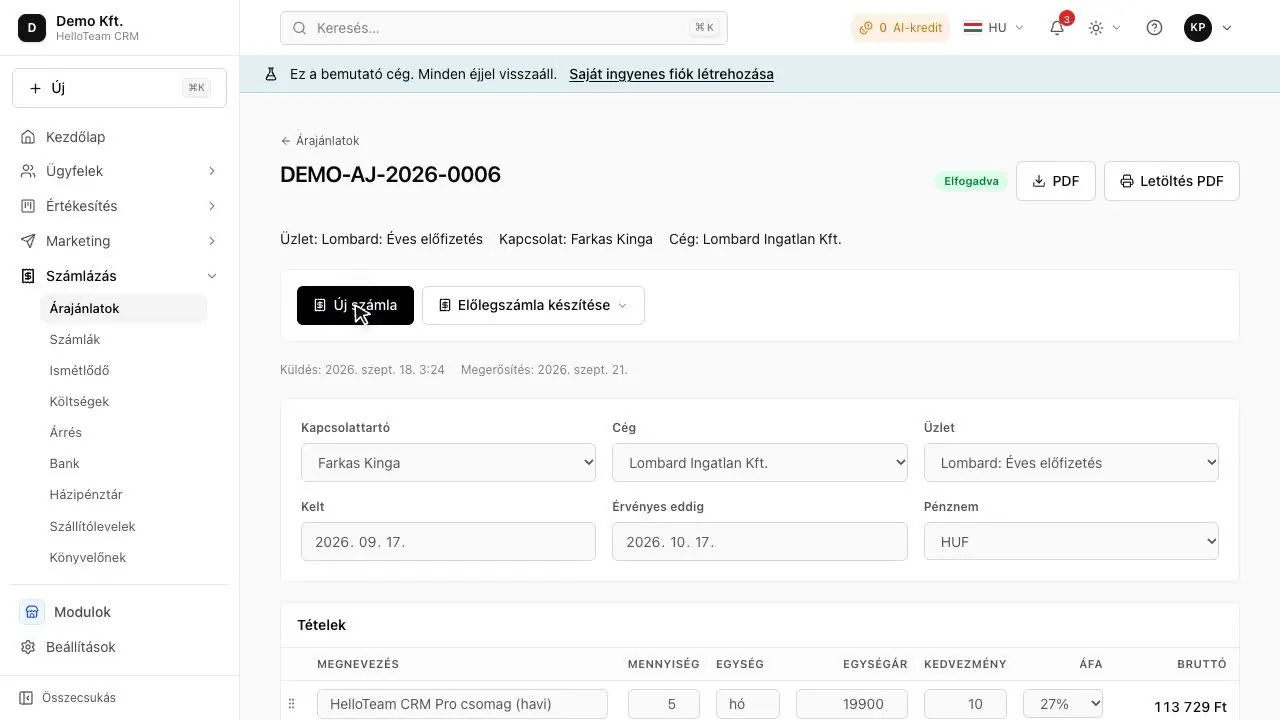
- In the Quotes module (paid module) the quote goes out as a link and the customer accepts it there; nothing has to be printed, signed and scanned back.
- A revised quote becomes a new revision rather than overwriting the first, so what you sent earlier stays visible.
- The price list in the Products module (paid module) serves both quotes and invoices, so the price of materials and labour lives in one place.
Once the quote is sent, the deal moves to the quote-sent stage and gets a next step: a phone call in a few days if no answer has come. The report shows which deal has stood in a stage too long, measured against that stage's own usual time.
What happens after acceptance, and how does it become an invoice?
Details
An accepted quote becomes a draft invoice with the same lines in one click. That needs the Invoicing module too (paid module); the Quotes module works on its own, and the convert-to-invoice button appears with the Invoicing module.
- A draft is not yet an invoice: you can review and complete it, and only issuing makes it official.
- Issuing goes through your company's own Számlázz.hu or Billingo account, and they report to NAV's Online Számla system; HelloCRM does not report itself.
- The same invoice cannot be issued twice, and an issued invoice is not edited: it is reversed (storno) or corrected.
- Without access details, invoicing runs as a dry run and says so; the issued invoice's PDF is kept in HelloCRM too.
The VAT rate, payment terms and hourly rate are your company's own settings, so they do not have to be entered on every invoice. The invoicing software's fee is set by Számlázz.hu or Billingo.
When do you need a proforma or an advance invoice?
Details
When a job's material cost is high, many small companies ask for money up front. Two documents can come into play then, and they do not mean the same thing.
- A proforma is a request for payment, not an invoice, so it is not reported to NAV. HelloCRM's Invoicing module issues proformas too, and never sends them for reporting.
- If an advance arrives, the VAT Act requires VAT and an invoice (an advance invoice) for the advance too. The final invoice covers the full amount and deducts the advance already invoiced.
- HelloCRM marks the document for an advance as an advance invoice at the invoicing provider.
This is general information, not tax advice. Which document your jobs need and when is something to check with your accountant, and NAV's rules are at onlineszamla.nav.gov.hu.
How do you follow up payment and overdue invoices?
Details
Issuing the invoice does not finish the job: the money has to arrive too. In a small company late payment is rarely ill will and far more often forgetfulness, for which a polite reminder is enough.
- The Invoicing module shows overdue items aged: who owes, and since when.
- With the Automations module (paid module) a polite reminder can go out on the day an invoice falls overdue, and if it is still unpaid a week later, it becomes a task for a colleague.
- If the company keeps a cash book, a cash payment is entered there too, with a voucher.
- A foreign-currency invoice is held at the rate it was issued at, not today's.
If a customer pays the same each month (a maintenance fee, a retainer), a recurring invoice goes out by itself. Dates follow the start date, so an invoice starting on the 31st goes out on 28 February and on 31 March again, and only one invoice can be made per period.
Why do one set of lines and per-line rounding matter?
Details
When you write the quote in a spreadsheet and the invoice in another program, you type the lines twice and can get them wrong twice. After a mistyped quantity or a forgotten discount the customer sees a different total on the invoice than the one they accepted, and that means explanations, a corrected invoice and late payment.
The rounding method matters too. A set of lines can be rounded line by line and then added up, or added up first and rounded at the end, and the two do not always agree. Three lines of 0.05 at 27% VAT come to 0.18 rounded per line and 0.19 rounded at the end. It is a small thing, but there must be no difference between a quote and the invoice made from it.
In HelloCRM the quote and the invoice use the same calculation, rounded per line, so the buyer sees the same total on both, and the total shown on screen is the one that is stored.
Where does each step live in HelloCRM?
Details
| Step | Module | Price |
|---|---|---|
| Enquiry through a form | Forms | paid module |
| Enquiry by email | Mailboxes | free |
| Contact and company | Contacts and companies | free |
| Deal in the pipeline | Deals | free |
| Call-back, to-do | Tasks | free |
| Price list | Products | paid module |
| Quote on a link | Quotes | paid module |
| Invoice, proforma, recurring invoice | Invoicing | paid module |
| Payment reminder | Automations | paid module |
Every paid module can be tried for 3 days; module prices will be published soon. The Számlázz.hu or Billingo fee comes on top.
In short
A small company's sale is six steps: enquiry, contact, a deal in the pipeline, a quote, acceptance, invoice and payment. It runs smoothly when every step builds on the same customer and the same lines: an accepted quote becomes a draft invoice in one click, and the two totals agree.
Where to read on
- How does a quote become an invoice?
- Quotes module
- Invoicing module
- Proforma invoice (díjbekérő)
- Advance invoice
- How do I invoice from a CRM in a way NAV accepts?
- Sales pipeline basics that actually matter
- Quote template: what goes into a quote, and how to send it
- Payment reminder template: three letters for an overdue invoice
Questions
Do I retype the lines when a quote becomes an invoice?
No: an accepted quote becomes a draft invoice with the same lines in one click, and the total is the same too.
Does HelloCRM send the invoice to NAV?
No: issuing and reporting go through your company's own Számlázz.hu or Billingo account.
What do I do if an issued invoice is wrong?
An issued invoice cannot be edited: it is reversed (storno) or corrected. Check the details with your accountant.
Is tracking deals free?
Yes, the Deals module is part of the free plan; quotes, invoicing and the price list are paid modules.
Sources
This is general information, not legal or tax advice. The rules come from: 2007. évi CXXVII. törvény az általános forgalmi adóról (Áfa tv.), Nemzeti Jogszabálytár (checked ); NAV Online Számla (checked )