New: the CRM says what to do next, and why
From 17 October HelloCRM suggests the next step on a deal, a contact, a company, a project, a quote and an invoice, from what the other modules hold, each with its reason. The home gathers them, late tasks get your attention, and every suggestion can be tuned to the company.
Published: · By the HelloCRM team
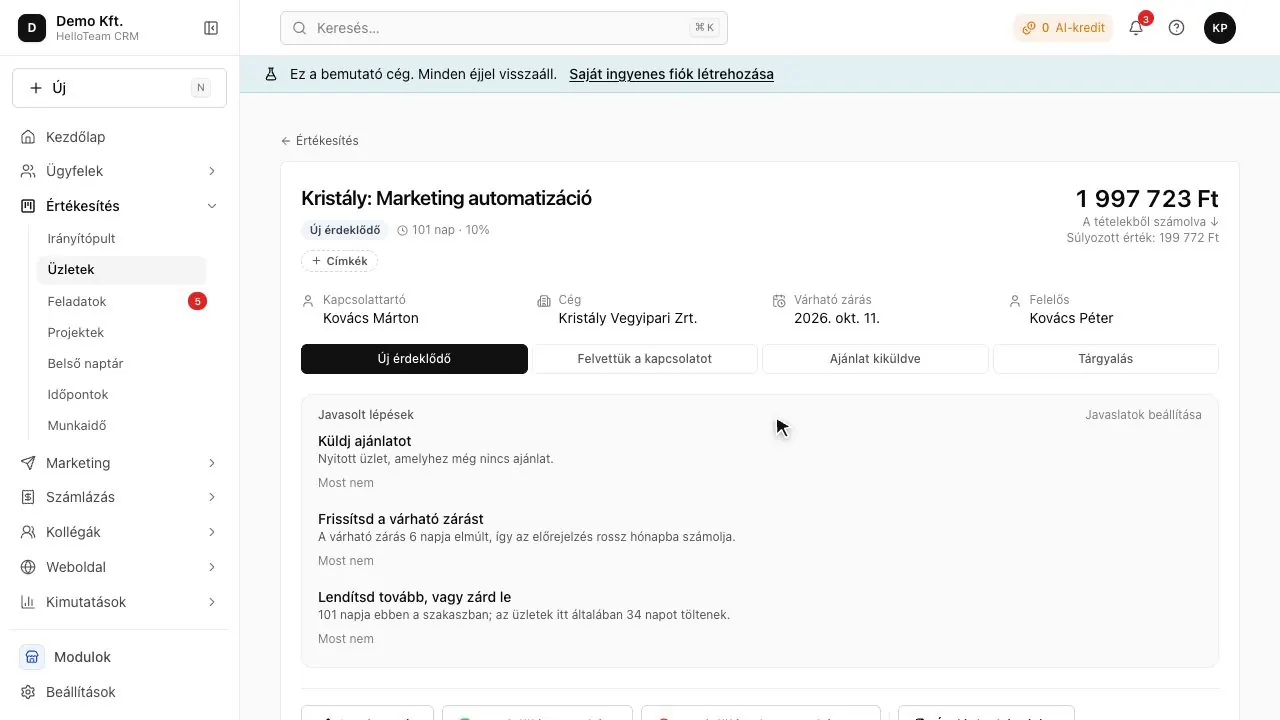
How does the CRM know what to do next?
From rules, not guesses: beside every suggestion is the fact that triggered it, for example that an invoice is 12 days past due, or a quote was opened 4 days ago and is still undecided. A module that is off, or a permission the reader does not have, never produces a suggestion, so none leads to a button that would refuse anyway.
- On a deal: send or chase a quote, invoice an accepted one, mark it won, a close date gone by, a stage it is stuck in, and the background: a meeting coming up, an open complaint, money owed from before, an advance from a late payer.
- On a contact: an overdue invoice, a ticket waiting on us, a fresh click in one of our emails, a duplicate, a birthday, and a customer who keeps writing to the helpdesk.
- On a project, a quote and an invoice: unbilled hours, an overdue milestone, a budget running low; a quote nobody opened or one past its date; a paid invoice whose deal is still open.
What does the home page show?
- Suggested steps: the first thing to do on each of your most valuable deals, in one list.
- Needs attention: your overdue invoices, quotes waiting for a decision and won deals not yet invoiced, beside stalled deals and support promises running out.
- The count of late tasks pulses in the menu until they are done; it can be switched off in the appearance settings, and nothing moves if your computer asks for reduced motion.
What else does it connect?
Details
- On a contact's and a company's page, one line: customer since when, deals won, how they pay, open tickets, which colleagues are also in touch, and the company's key person.
- At a deal's stage: what share of deals that reached it were won, and typically how fast, from at least five closed deals.
- On a product's page, what is often bought with it; on a quote, what usually goes with its products.
- Beside a ticket, the customer's open deal, overdue invoice and the knowledge base entries on its subject; on a campaign, how many new deals its recipients opened within two weeks.
How is it tuned to the company?
Details
On Settings › Suggestions an administrator sets after how many days to chase a quote or a quiet customer, when to offer something new, how many unbilled hours to flag, and can switch any kind of suggestion off. Anybody can put one suggestion off for themselves with “Not now”: they will not see it on that record for two weeks, and it comes back by itself if its reason still holds.
The assistant sees the same suggestions, so asked what to do today it answers what the home page says, and only ever what the person asking may see with their own access.
Questions
Do we have to switch something off if we do not want suggestions?
Nothing has to be done, but it can be: on Settings › Suggestions every kind of suggestion can be switched off one by one, and the pulsing task count can be switched off in the appearance settings, per person.
Do colleagues see each other's customers through the suggestions?
No. Every suggestion and every count is worked out with the viewer's own access: somebody who may see only their own customers gets neither a suggestion nor a count about a colleague's.