Customer service for a small business: tickets from email, step by step
Customer service in a small company works when every incoming request becomes a ticket: with its own number, an owner, a status and a promised time. No new channel is needed: mail to a support mailbox opens tickets, the reply goes into the same conversation, and it shows what has waited too long. In HelloCRM the Helpdesk module does this.
Published: · By the HelloCRM team
The core CRM is free forever. Pre-register and be among the first in.
When does an info@ inbox stop being enough?
While one person reads the shared address, an inbox works well. The trouble starts when two or three people watch the same mail. Suppose that in a three-person online shop two colleagues answer the same complaint one morning, each promising something different, while a third email gets no answer at all because everyone thought someone else had dealt with it.
Signs that it is time to change:
- Two people answer the same email, or nobody does.
- A thread falls apart and nobody can see what was promised earlier.
- You cannot say which customer has waited longest.
- Requests stall during someone's holiday because the mail is in their own folder.
- You type the same answer several times a day.
What is a support ticket?
A support ticket is a recorded customer request, with its own number, status, owner and deadline. Instead of a shared inbox, a ticket system shows who is handling a request, what comes next and which request has waited too long.
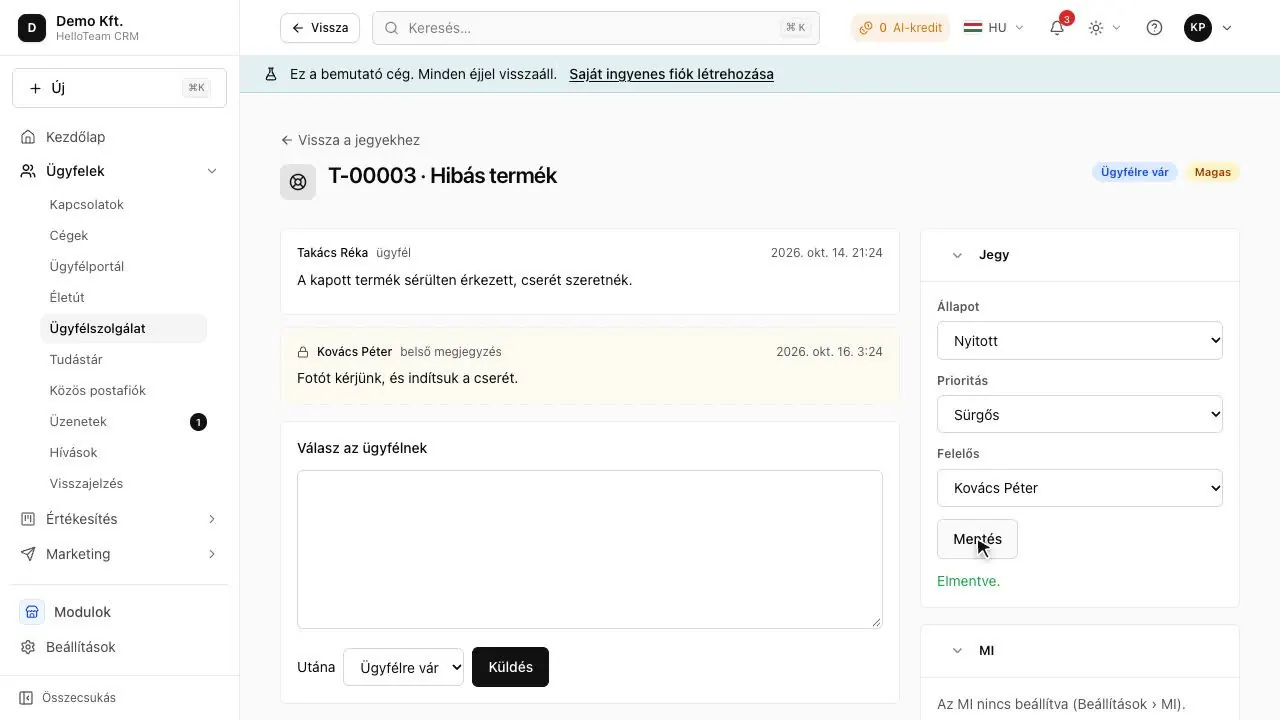
In HelloCRM a ticket has four states: open, waiting on customer, solved and closed. There are four priorities: low, normal, high and urgent. A ticket number looks like T-00042, and the ticket also sits on the customer's timeline rather than in a separate system: whoever opens the contact sees their earlier cases too.
A ticket is not bureaucracy. An email becomes manageable because it has an owner and a deadline; everything else the system adds follows from those two.
How does an incoming email become a ticket?
Details
Setting it up takes a morning:
- Switch on the Helpdesk module.
- Connect the company's support address (info@, for example) under Mailboxes. It must be a company mailbox, not someone's personal one.
- Mark this mailbox as a support mailbox: from then on every incoming email opens a ticket or joins an existing conversation.
- Set the promised reply time and resolution time for each priority.
- Write the first few saved replies for the most common questions.
A few rules the system holds to by itself:
- One conversation has one live ticket, so a thread does not keep opening new tickets.
- If the customer replies to a ticket that was waiting on them or solved, it reopens.
- A [T-00042] in the subject joins that ticket only from its requester, so a stranger cannot add to someone else's conversation by guessing the number.
How do priorities and promised response times (SLA) work?
Details
An SLA (service level agreement) is a promised level of service; in a helpdesk, usually how soon the first reply and the resolution arrive. Different deadlines per priority are common: an urgent fault gets a faster answer than a general question.
- The deadlines are stamped when a ticket opens, from your company's own table. Changing the table later does not rewrite promises already made.
- If a ticket's priority changes, its deadlines are counted again from when it opened, not from the moment of the change.
- Deadlines are in calendar hours, because that is what the customer checks against.
- When a deadline is missed, the owner is told once; if the ticket has no owner, the administrators are.
In a small company it is worth starting modestly: promise a time you can keep in a bad week too. A promise kept is worth more than an ambitious deadline missed regularly.
Who answers? Assignment, saved replies, internal notes
Details
Every ticket has one owner, so four people do not answer the same one. You can pick the owner by hand, or set up a rota (Settings → Assignment, for administrators): in turn (round robin), or to whoever has the fewest open cases. The system only picks colleagues who still work at the company, and by default skips those on approved leave.
- Saved replies: write the text for common questions once, insert it in a ticket with one click, then adjust it.
- Internal notes: colleagues discuss inside the ticket, and the customer never sees it.
- Visibility: a ticket about a customer follows that contact's visibility, and is also visible to whoever it is assigned to.
If the info@ address gets not only support mail but quote requests and partner mail too, the Shared inbox module (paid module) shows these as conversations and lets you assign them; mail that became a ticket lives in the helpdesk.
Where else can requests come from, and can AI help?
Details
A customer does not always send an email. In HelloCRM several channels go into the same queue, so the team watches one list:
- Customer portal (free): on a link, with no account, the customer sees their own tickets, opens new ones and replies, without the internal notes.
- Website chat: a chat from your published site is a ticket just like an email; if the visitor has left, the answer goes by email too.
- Forms: a form submission can open a ticket too.
AI is optional: with the AI assistant module (free) you can ask for a reply draft, a summary and a priority suggestion on a ticket. The draft goes into the reply box, and nothing is sent until you send it. Every AI request is metered, and the free plan has no AI.
How do you know customer service is working?
Details
Two things are worth measuring: whether you keep what you promised, and whether the customer is happy with the outcome. The first shows on the tickets: the system flags a ticket close to or past its deadline, so each week you can see where you slipped and why.
For the second there is the Surveys module (paid module): it sends NPS or satisfaction surveys, the answer lands on the contact, and the owner of a customer answering 0-6 is notified the same day. A customer does not get the same survey again within its quiet period (90 days by default). With the Automations module the question can go out by itself after a ticket is solved.
When you review, do not only look at the numbers: read a few closed tickets from start to finish each week. That shows which saved reply needs work, and which question would be better answered on the website.
Which modules do you need?
Details
| Module | What it is for | Price |
|---|---|---|
| Helpdesk | Tickets, promised times, assignment, saved replies | paid module |
| Mailboxes | Connecting the company mailbox | free |
| Customer portal | The customer's own tickets on a link | free |
| Shared inbox | Assigning mail that is not a ticket | paid module |
| Surveys | Measuring NPS and satisfaction | paid module |
| AI assistant | Reply drafts, summaries, triage | free |
For a small team the first three rows are often enough: the Helpdesk module and the two free ones. Switch the rest on when you really need it.
Every paid module can be tried for 3 days and bought one at a time. The free plan's limits: Users: 3; Contacts: 2,000; Emails / month: 500; Storage: 1 GB.
In short
Customer service in a small company works when every request becomes a ticket: with a number, an owner, a status and a promised time. Mail to a support mailbox opens tickets, the reply goes into the same conversation, and it shows what has waited too long.
Where to read on
Questions
Do I need a separate support email address?
Not necessarily: you can mark your existing company address (info@, for example) as the support mailbox. It must be a company mailbox, not a personal one.
What happens if the customer replies to a finished case?
If the ticket was waiting on them or solved, the reply reopens it, so it does not get lost as a new email.
Does the customer see internal notes?
No: internal notes are for colleagues and appear neither in the portal nor in the replies.
Can AI answer for us?
On a ticket, AI only writes a draft that you send. In the website chat it can answer first, from the public knowledge base, and hands over to a colleague when it does not know.