Invoicing and NAV Online Számla: what to know when you invoice from a CRM
If you invoice from a CRM, since 1 January 2021 the data of your invoices must, as a rule, be reported to NAV's Online Számla system, and the invoicing software does that reporting. So the CRM should not report by itself: it issues the invoice through invoicing software that reports to NAV. HelloCRM uses your own Számlázz.hu or Billingo account for this.
Published: · By the HelloCRM team
The core CRM is free forever. Pre-register and be among the first in.
What is NAV Online Számla, and what goes into it?
NAV Online Számla is the Hungarian tax authority's system to which invoicing software reports the data of domestic invoices. Since 1 January 2021, as a rule, the data of every invoice issued in Hungary must be reported, including invoices to private individuals; in that case the buyer's personal data is not reported.
The invoicing software does the reporting when the invoice is issued. Your part, as the business issuing the invoice, is to invoice with software that does this, and to get the invoice's data right: the buyer, the lines, the VAT, the date of supply.
Exceptions, deadlines and penalties are set out on the NAV Online Számla site (onlineszamla.nav.gov.hu) and in the VAT Act. This article is general information, not tax advice: check the details for your business with your accountant.
Why should the CRM not report to NAV itself?
NAV reporting is a legal obligation that established invoicing software has handled for years, against NAV's own technical specification. A CRM has no reason to reimplement it: it would do the same work again, with one more way to get it wrong. The better split is that the CRM composes the invoice (buyer, lines, price, VAT) and the invoicing software issues and reports it.
- The invoice is also kept in your invoicing account, independently of the CRM.
- If you ever switch CRM, your issued invoices do not disappear.
- Your accountant sees invoicing software they already know.
- The CRM keeps which quote and which deal the invoice came from.
This needs a separate invoicing subscription (Számlázz.hu or Billingo); they set their own fees.
How does HelloCRM invoice?
Details
Invoicing in HelloCRM is the Invoicing module (paid module, with a 3-day trial). Setting it up takes a few steps:
- Switch on the module.
- In settings, enter your Számlázz.hu or Billingo account's access details.
- Set your company defaults: VAT rate, payment terms.
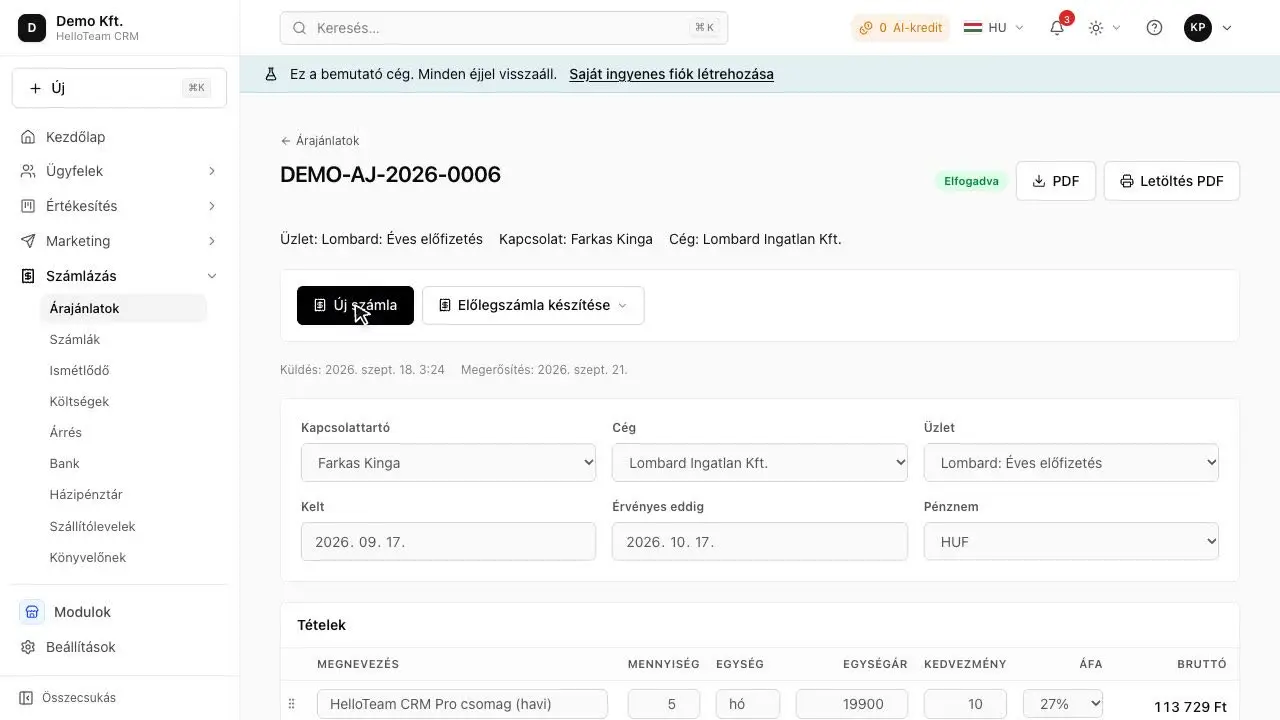
- Create the invoice, or convert an accepted quote, then issue it.
A few things the system holds to by itself:
- HelloCRM does not report to NAV itself: Számlázz.hu or Billingo issues the invoice from your own account and reports it.
- A draft is not issued as it is, and the same invoice cannot be issued twice.
- Without access details the system runs as a dry run and says so; no real invoice is made.
- The issued invoice's PDF is kept in HelloCRM too.
- Paper or e-invoice form follows your settings in the invoicing account.
The same module has recurring invoices (anchored to the start date, one invoice per period) and the ageing of overdue items: who owes, and since when.
What can you do when an issued invoice is wrong?
Details
An issued invoice cannot be deleted or rewritten: it is cancelled (storno) or corrected. A storno is also reported to NAV and reverses the original invoice. If only one line is wrong, a corrective invoice may be the alternative.
That is why an issued invoice cannot be edited in HelloCRM. It is reversed with a storno, which the invoicing provider issues and reports, so the two documents stand side by side at NAV and in your own records.
The VAT Act has rules for documents that correct or cancel an invoice. Whether a mistake calls for a storno or a corrective invoice is a question for your accountant. Suppose, for example, that a small joinery workshop issues an invoice to the wrong buyer name: that is no longer fixing a field, it is a document that has to be put right by the rules.
Are proformas and advance invoices reported?
Details
A proforma is a request for payment, not an invoice, so it is not reported. If an advance arrives on a proforma, the VAT Act requires VAT and an invoice (an advance invoice) for the advance too; the final invoice covers the full amount and deducts the advance already invoiced.
| Document | What it is for | An invoice? |
|---|---|---|
| Proforma | Asks for payment before delivery or the invoice | No, so it is not reported |
| Advance invoice | Records an advance received before delivery | Yes |
| Invoice | Records the supply | Yes, reported as a rule |
| Storno | Cancels an issued invoice | Yes, also reported to NAV |
HelloCRM issues proformas too and never sends them for reporting, and it marks the document for an advance as an advance invoice at the invoicing provider. Check the exact handling with your accountant.
How does the system know the VAT rate and the exchange rate?
Details
Under section 82 of the VAT Act the standard rate is 27 percent; goods and services listed in the Act's annexes carry 18 or 5 percent. Which rate applies to an item is always a question for your accountant.
- The VAT rate is your company's own default and can be changed per line.
- A 0 percent line asks for an exemption reason, so the invoice goes out with the right marking.
- Totals are rounded per line, so the quote and the invoice show the same amount.
- A foreign-currency invoice uses the rate on the day it was issued, not today's.
For the small-business exemption, according to NAV the revenue limit for choosing it is HUF 20 million from 2026 (18 million before), HUF 22 million from 2027 and HUF 24 million from 2028. An exempt business charges no VAT; NAV's site describes the conditions, and it is worth working the numbers with an accountant before deciding.
What should you agree with your accountant before invoicing from a CRM?
Details
Half an hour with your accountant saves a lot of corrections later. Take this list with you:
- Which invoicing software and account do we use, and who has access?
- Which VAT rate applies to which product or service?
- Are we, or will we be, under the small-business exemption?
- When do we send a proforma, and when is an advance invoice needed?
- For a wrong invoice, do we issue a storno or a corrective invoice?
- Paper or e-invoice, and have buyers agreed to e-invoices?
- Do we have customers in a foreign currency, and how do we handle them?
- How does the month's invoicing reach the accountant?
Some of the answers go into HelloCRM's company defaults (VAT rate, payment terms), others into your invoicing account's settings. If one has no answer yet, that is a useful result too: you know what is still to be settled.
What should you check in any CRM's invoicing?
Details
If you are choosing a CRM and invoicing matters, these questions are worth asking, whichever system it is:
- Who reports to NAV: the CRM itself, or invoicing software, and from whose account?
- What happens without access details: does the system say so, or quietly mark the invoice as done?
- Can the same invoice be issued twice by accident?
- Can an issued invoice be edited? (It should not be: a storno or a correction is needed.)
- Does the quote become an invoice with the same lines and the same rounding?
- Is the PDF kept, and can the data be taken out if you want to switch?
If a system answers these plainly, invoicing will not be its weak point. If the answers are vague, ask in writing.
In short
The data of domestic invoices must, as a rule, be reported to NAV's Online Számla system, and the invoicing software does that, so a CRM should not report by itself. HelloCRM issues invoices through your own Számlázz.hu or Billingo account, and they report; check the details with your accountant and on NAV's site.
Where to read on
- Invoicing module
- NAV Online Számla
- Storno invoice (sztornó)
- How do I invoice from a CRM in a way NAV accepts?
- What is the difference between a proforma and an invoice?
- Invoicing basics for Hungarian small businesses, with official sources
- Proforma or advance invoice? The difference, and when you need each
- Payment reminder template: three letters for an overdue invoice
Questions
Does HelloCRM report to NAV itself?
No. Számlázz.hu or Billingo issues the invoice from your own account and reports it to NAV's Online Számla system.
Do I need a separate invoicing subscription?
Yes, a Számlázz.hu or Billingo account is needed; they set their own fees.
Does a proforma go to NAV?
No: a proforma is not an invoice, so it is not reported. If an advance arrives on it, an advance invoice is needed.
What happens if I do not enter the invoicing access details?
The system runs as a dry run and says so; no real invoice is made and nothing reaches NAV.
Can I change an issued invoice?
No: an issued invoice is put right with a storno or a corrective invoice. Which one, check with your accountant.
Sources
This is general information, not legal or tax advice. The rules come from: NAV Online Számla (checked ); 2007. évi CXXVII. törvény az általános forgalmi adóról (Áfa tv.), Nemzeti Jogszabálytár (checked ); NAV: Emelkedik az alanyi adómentesség értékhatára (checked )