Helpdesk ticketing systems for small businesses compared
A small company should choose a helpdesk by whether mail to its support address becomes a ticket with an owner, whether it promises response times, whether it has saved replies, and whether people who work with the customer otherwise can see the ticket. This guide goes through the criteria, then compares six systems from the vendors' own pages.
Published: · By the HelloCRM team
The core CRM is free forever. Pre-register and be among the first in.
What should you look for in a ticketing system?
In a small company customer service is usually one shared mailbox that three people read, each thinking someone else has replied. A ticketing system sorts that out: every request gets a number, an owner, a status and a deadline. Before you try any of them, write down how many requests arrive a week, on which channel, and who answers them. The list below builds on that.
- Email to ticket: mail to the support address becomes a ticket by itself, and the reply goes back into the same thread.
- Owner and status: it shows whose ticket it is and whether it waits on the customer or on us.
- Promised response times (SLA): per priority, with a warning before one runs out.
- Saved replies for the common questions, so nobody types the same answer for the tenth time.
- A customer portal or knowledge base where customers find answers themselves or see their own tickets.
- Live chat on the website, if that is where customers ask.
- A Hungarian interface for staff and a Hungarian portal for customers.
- The ticket on the customer's record: whoever sends a quote or an invoice should see that the customer has an open complaint.
A promised response time is worth something when the system stamps it when the ticket opens, rather than counting from the last change. Ask what happens when a ticket is moved to a higher priority a week later: does the clock restart, or does it keep counting from the opening?
Plans matter a lot here. According to the vendors' pages, in several systems promised response times, the knowledge base or live chat only come with a higher plan, so in a trial look at the plan you will actually pay for.
How do the systems compare on the main criteria?
| Criterion | HelloCRMus | Zendesk | Freshdesk | Zoho Desk | LiveAgent | Help Scout |
|---|---|---|---|---|---|---|
| Hungarian interface or customer portal | YesHungarian and English | Yessourceagent interface and help centre | Partlysourcethe customer portal, from the Pro plan | Partlysourcethe help centre | Not statedsourcethe site is Hungarian; interface languages not listed | Not statedsource |
| Email becomes a ticket | Yesfrom the support mailbox's mail | Yessource | Yessource | Yessource | Yessource | Yessourceit calls them conversations |
| Promised response times (SLA) | Yesper priority, stamped when it opens | Yessourcefrom the Growth plan | Yessourceon the Pro and Enterprise plans | Yessourcenot on the free plan | Yessourcefrom the Medium plan | Yessource |
| Saved replies | Yes | Yessourcemacros | Yessource | Yessourcesnippets | Yessource | Yessource |
| Customer portal or knowledge base | Yesa portal with one's own tickets; knowledge base a separate module | Yessource | Yessource | Yessourceknowledge base from the Standard plan | Yessource | Yessource |
| Live chat on the website | Yeson a website built in HelloCRM | Yessourceon the Suite plans | Not statedsourceit mentions a web widget | Yessourcefrom the Standard plan | Yessource | Yessource |
| A free plan with no time limit | Nothe core CRM is free, Helpdesk is a paid module | Nosourcea trial period | Not statedsourceits pages contradict each other | Yessource | Nosourcea trial period | Yessource |
From the vendors' own pages, read 2026-10-17. "Not stated" means we did not find it on the pages we read; the product may still do it. Prices and ratings were not compared. Check the vendor's site before deciding, because plans change.
Which ticketing systems can a small company choose from?
Details
The six systems below were described from the vendors' own pages on 17 October 2026, only with what we read there. It is not a ranking: first the large international players, then LiveAgent, which has a Hungarian site, and Help Scout, and HelloCRM last, because it is our product.
Zendesk. A ticketing system that brings email, messaging, phone and social channels into one place and assigns tickets automatically. Its language support page lists Hungarian among the main languages for the agent interface and the help centre. Macros apply pre-written replies in one click, SLA timing comes from the Growth plan, and live chat is on the Suite plans. Instead of a free plan it offers a trial period.
The vendor's own pages: Zendesk: ticketing system (read ); Zendesk: language support (read ); Zendesk: pricing (read )
Freshdesk. Freshworks' customer service system, with omnichannel ticketing and automated workflows. Mail sent to the configured address becomes a ticket automatically, canned responses can be saved, and several SLA policies can be set on the Pro and Enterprise plans. Hungarian is among the customer portal's languages, with multilingual support from the Pro plan. On a free plan its pages disagree: the pricing page mentions only a trial, while a help article mentions a free programme.
The vendor's own pages: Freshdesk (read ); Freshdesk: features (read ); Freshdesk: pricing (read ); Freshdesk support: languages (read ); Freshdesk support: support email (read ); Freshworks support: canned responses (read )
Zoho Desk. A customer service system whose free-forever plan includes email ticketing. Service level agreements with automated escalation, the knowledge base and a live chat widget for the website come from the Standard plan. Pre-written phrases can be inserted as snippets, and Hungarian is among the help centre's languages.
The vendor's own pages: Zoho Desk (read ); Zoho Desk: pricing (read ); Zoho Desk: help centre languages (read ); Zoho blog: snippets (read )
LiveAgent. A customer service platform with a Hungarian-language site that combines ticketing, live chat, an AI chatbot and a call centre. Messages become tickets automatically, there are pre-written replies, a customer portal with a knowledge base, and SLAs from the Medium plan. The vendor says the software supports many languages, but the pages we read do not list whether Hungarian is one. Instead of a free plan it offers a trial period.
The vendor's own pages: LiveAgent (magyar) (read ); LiveAgent: árazás (read ); LiveAgent: jellemzők (read ); LiveAgent: customer service (read )
Help Scout. A shared inbox that brings email, SMS, social, chat and voice into one place; it calls tickets conversations. It has a searchable library of saved replies, response targets, a help centre or knowledge base and live chat for the website. It has a free plan that needs no payment method. The pages we read say nothing about languages.
The vendor's own pages: Help Scout (read ); Help Scout: pricing (read )
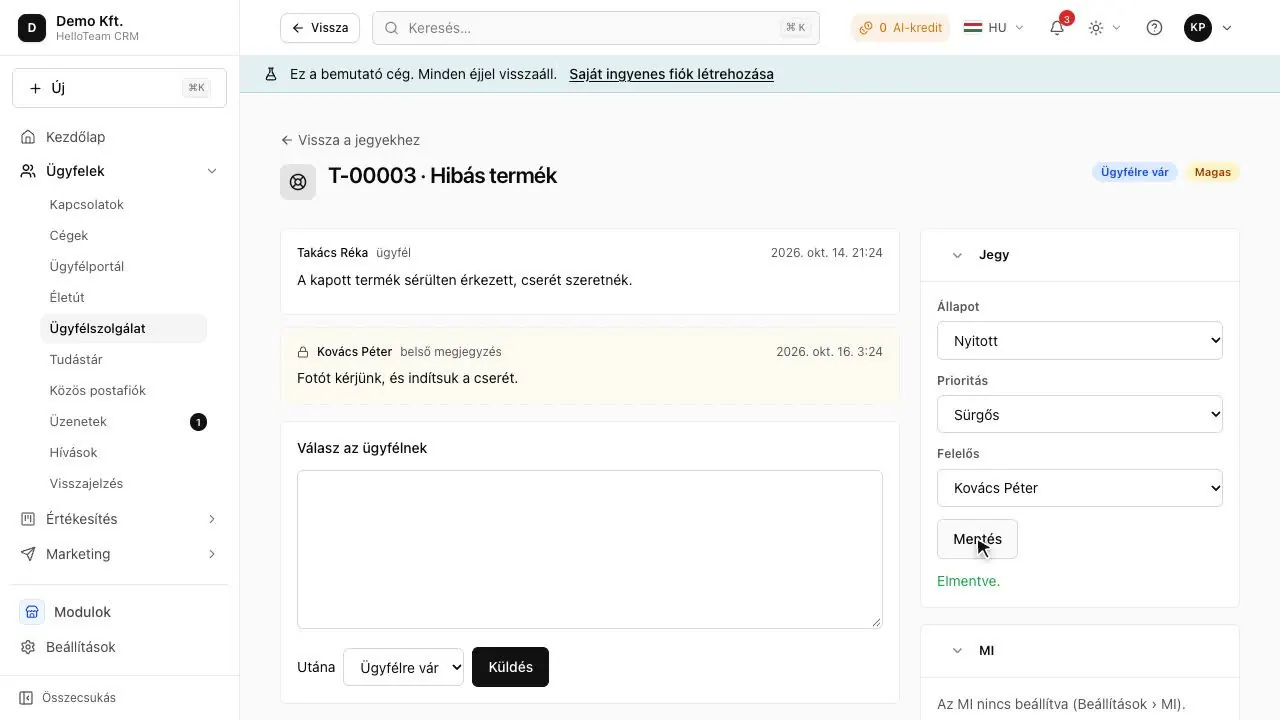
HelloCRM. A web CRM in Hungarian and English whose Helpdesk module opens tickets with promised times from the support mailbox's mail, and the ticket sits on the customer's timeline too. The details are below.
What does HelloCRM's Helpdesk module do?
Details
- Every message to a support mailbox becomes a ticket numbered like T-00042; the customer's answer joins the same ticket and reopens it if it was waiting on them.
- Status, priority, owner and two promised times, stamped when the ticket opens; a broken promise is reported once to the owner or the administrators.
- Saved replies, and a rota, so incoming tickets go in turn or to the least busy colleague.
- A customer portal where customers see their own tickets without the internal notes; live chat on a website built in HelloCRM, which is a ticket too.
- The ticket sits on the customer's timeline, and who sees it follows the customer's record-level access.
Where it stands: the free core CRM already works in the browser, at app.helloteam.hu. Helpdesk is a paid add-on module, bought on its own; prices are not published yet, the paid modules are coming soon, and people who pre-register hear first. Tickets can be tried in the demo company without signing up.
How do you decide in two weeks?
Details
- Pick two systems from the table on the criteria that decide for you.
- Forward a copy of the support address into both and work for a week with real mail.
- Write five saved replies for the most common questions and see how fast a colleague finds them.
- Set a promised response time and let one ticket run over: who is told?
- Check whether whoever sends the customer a quote can see the ticket too.
In short
Good helpdesk software for a small company turns mail to the support address into a ticket with an owner and a promised time, has saved replies, and lets people who work with the customer otherwise see the ticket. According to the vendors' pages Zendesk, Freshdesk, Zoho Desk, LiveAgent, Help Scout and HelloCRM differ on these, and SLAs or live chat often come only with a higher plan. Try two systems for two weeks with real mail, on the plan you would pay for.
Where to read on
Questions
Is there a free helpdesk?
According to the vendors' pages (2026-10-17) Zoho Desk and Help Scout have a free plan with no time limit; Zoho Desk's free plan has no SLAs and no knowledge base. HelloCRM's core CRM is free; Helpdesk is a paid add-on.
Which helpdesks are in Hungarian?
According to the pages we read (2026-10-17) Zendesk lists Hungarian for the agent interface and the help centre, Freshdesk and Zoho Desk for the customer-facing portal; LiveAgent's site is in Hungarian. HelloCRM's interface is Hungarian and English.
How does a shared inbox differ from a ticketing system?
In a shared inbox a message has an owner; in a ticketing system a request also has a number, a status and a promised time, and it shows what has waited too long. With few requests a shared inbox is enough.
Does the helpdesk need to be in the CRM?
It does not have to be, but if it is separate, sales cannot see that the customer has an open complaint, and the same person has to be entered twice in two systems.